

Share My QR |
|
Success!
Sellers
Sellers
explore
Downtown Austin is the high-rise core along Congress Avenue and Lady Bird Lake, stitched together by walkable sub-districts: Rainey Street's condo towers and bungalow bars, the Second Street District's shopping and theaters, the Warehouse District's restaurants and lofts, and Sixth Street's live-music strip. This is lock-and-leave living, with work, dinner, and the lake trail within walking distance.
If you're weighing urban-core options, downtown sits at the density-and-convenience end of the spectrum. East Austin gets you a shorter commute-in with more house-scale living; South Austin trades some walkability for a funkier, lower-key feel; West Austin trades walkability for space and quiet. The right pocket depends on how much you actually use a car, and whether a yard matters to you at all.
Strengths: Lock-and-leave condo living, a walk to offices and the entertainment districts, and no yard to maintain. HOA dues and building fees are part of the real monthly cost, so budget for them up front.
Trade-offs: Mostly condos and high-rises, with elevators and paid parking; few single-family homes or yards; street noise near Rainey and Sixth. For a traditional single-family home, look at East Austin, South Austin, or West Austin instead.
Most errands and evenings happen on foot: coffee, the Lady Bird Lake hike-and-bike trail, kayaking off the boardwalk, and a dense restaurant and live-music scene within a few blocks of most buildings. Weekends bring real tourism and event traffic — SXSW, ACL, F1 week, and a steady convention calendar — which brings real energy along with crowds and noise. Tour during a big event weekend before you commit to a high floor with a view.
Downtown residents mostly walk, bike, or scooter for day-to-day life. I-35 and MoPac both border downtown, so regional trips are quick in theory, but rush-hour congestion on both is real, not a footnote. Parking is scarce and usually a paid add-on to the unit — confirm how many dedicated spots (if any) come with a specific listing before you fall for the floor plan.
Austin ISD serves downtown addresses. If school zoning matters to you, verify the AISD attendance zone for the specific building, and ask us about nearby neighborhoods with single-family homes to compare.
High-rise condos and luxury towers dominate; there is essentially no single-family stock downtown. Price per square foot runs among the highest in the metro, and unit sizes range from studios to penthouse product. HOA dues and building amenities (pool, gym, concierge, package handling) are a major part of the real monthly cost — compare dues and reserve fund health across buildings, not just list price.
East Austin — more house-scale living and a still-short hop to downtown
South Austin — funkier and more laid-back, still walkable to the river trail and Zilker
West Austin — quieter, more established, single-family living with more green space
Lock-and-leave condo living, a walk to offices, dining, nightlife, and the lake trail, and no yard to maintain.
East Austin trades some walkability for house-scale living and a more residential feel, while staying minutes from downtown.
Most day-to-day trips are on foot. I-35 and MoPac both border downtown for regional access, but expect rush-hour congestion on either, and budget for paid parking.
Austin ISD serves downtown addresses. Verify the AISD zone for any specific building, and ask us about nearby neighborhoods with single-family homes to compare.
High-rise condos and luxury towers, with almost no single-family stock. Compare HOA dues and building amenities across properties, not just price per square foot.
Sign up for VIP alerts below and we'll send matching listings as they hit the market, along with context on which buildings are worth the dues.
Get VIP listing alerts for this corridor, then talk strategy with the team that knows which buildings are worth the HOA dues.
Free market report
We want to ensure that you have all the information needed to make the best decisions when it comes to your home goals. When you enter your info in the form you will get instant access to the area's latest market report, complete with sales and demographic trends.
Market Report
Read helpful resources and articles related to the area.
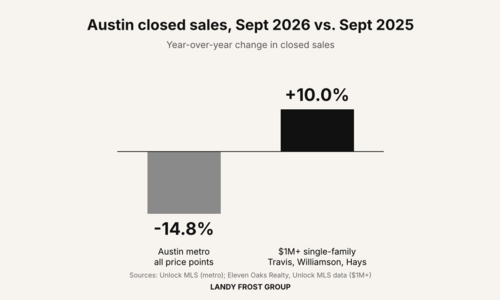
Updated Oct 30, 2026. Data: Unlock MLS and the third-party sources named in…
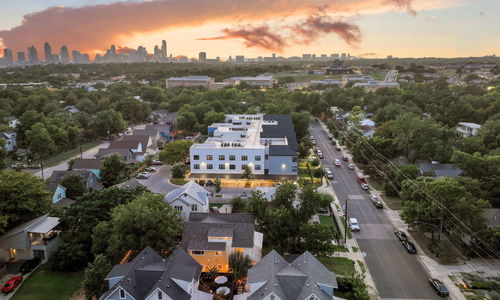
By Tim Landy, Landy Frost Group at CompassAll monthly figures below are for…

Frosty Gives Back, our annual holiday charity gala, turns 10 this year. On…
Share My QR |
|
We firmly believe that the internet should be available and accessible to anyone, and are committed to providing a website that is accessible to the widest possible audience, regardless of circumstance and ability.
To fulfill this, we aim to adhere as strictly as possible to the World Wide Web Consortium’s (W3C) Web Content Accessibility Guidelines 2.1 (WCAG 2.1) at the AA level. These guidelines explain how to make web content accessible to people with a wide array of disabilities. Complying with those guidelines helps us ensure that the website is accessible to all people: blind people, people with motor impairments, visual impairment, cognitive disabilities, and more.
This website utilizes various technologies that are meant to make it as accessible as possible at all times. We utilize an accessibility interface that allows persons with specific disabilities to adjust the website’s UI (user interface) and design it to their personal needs.
Additionally, the website utilizes an AI-based application that runs in the background and optimizes its accessibility level constantly. This application remediates the website’s HTML, adapts Its functionality and behavior for screen-readers used by the blind users, and for keyboard functions used by individuals with motor impairments.
If you’ve found a malfunction or have ideas for improvement, we’ll be happy to hear from you. You can reach out to the website’s operators by using the following email [email protected]
Our website implements the ARIA attributes (Accessible Rich Internet Applications) technique, alongside various different behavioral changes, to ensure blind users visiting with screen-readers are able to read, comprehend, and enjoy the website’s functions. As soon as a user with a screen-reader enters your site, they immediately receive a prompt to enter the Screen-Reader Profile so they can browse and operate your site effectively. Here’s how our website covers some of the most important screen-reader requirements, alongside console screenshots of code examples:
Screen-reader optimization: we run a background process that learns the website’s components from top to bottom, to ensure ongoing compliance even when updating the website. In this process, we provide screen-readers with meaningful data using the ARIA set of attributes. For example, we provide accurate form labels; descriptions for actionable icons (social media icons, search icons, cart icons, etc.); validation guidance for form inputs; element roles such as buttons, menus, modal dialogues (popups), and others. Additionally, the background process scans all of the website’s images and provides an accurate and meaningful image-object-recognition-based description as an ALT (alternate text) tag for images that are not described. It will also extract texts that are embedded within the image, using an OCR (optical character recognition) technology. To turn on screen-reader adjustments at any time, users need only to press the Alt+1 keyboard combination. Screen-reader users also get automatic announcements to turn the Screen-reader mode on as soon as they enter the website.
These adjustments are compatible with all popular screen readers, including JAWS and NVDA.
Keyboard navigation optimization: The background process also adjusts the website’s HTML, and adds various behaviors using JavaScript code to make the website operable by the keyboard. This includes the ability to navigate the website using the Tab and Shift+Tab keys, operate dropdowns with the arrow keys, close them with Esc, trigger buttons and links using the Enter key, navigate between radio and checkbox elements using the arrow keys, and fill them in with the Spacebar or Enter key.Additionally, keyboard users will find quick-navigation and content-skip menus, available at any time by clicking Alt+1, or as the first elements of the site while navigating with the keyboard. The background process also handles triggered popups by moving the keyboard focus towards them as soon as they appear, and not allow the focus drift outside of it.
Users can also use shortcuts such as “M” (menus), “H” (headings), “F” (forms), “B” (buttons), and “G” (graphics) to jump to specific elements.
We aim to support the widest array of browsers and assistive technologies as possible, so our users can choose the best fitting tools for them, with as few limitations as possible. Therefore, we have worked very hard to be able to support all major systems that comprise over 95% of the user market share including Google Chrome, Mozilla Firefox, Apple Safari, Opera and Microsoft Edge, JAWS and NVDA (screen readers), both for Windows and for MAC users.
Despite our very best efforts to allow anybody to adjust the website to their needs, there may still be pages or sections that are not fully accessible, are in the process of becoming accessible, or are lacking an adequate technological solution to make them accessible. Still, we are continually improving our accessibility, adding, updating and improving its options and features, and developing and adopting new technologies. All this is meant to reach the optimal level of accessibility, following technological advancements. For any assistance, please reach out to [email protected]